
Professional radio playout. In a browser.
£1 for 5 days on Broadcast,
then £59/moStart your £1 trial
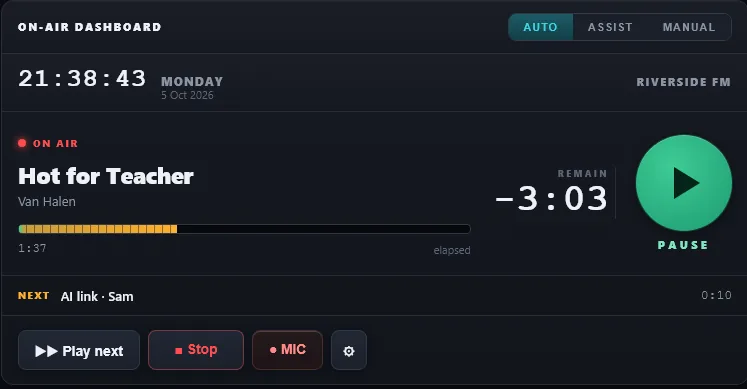
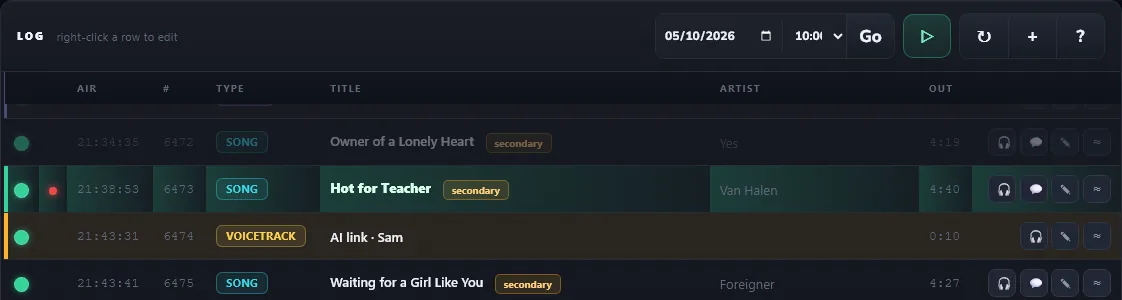
RadioStudio24 runs a real station from a browser tab: the On Air desk, a cloud engine that keeps you on air 24/7 with no studio PC, the Planner, segue editing, voicetracking from your phone, an AI presenter, and local travel and weather. And we measure it every day, so it stays on air.
Already a station? Log in to your studio
£1 for 5 days on Broadcast · then £59/mo · Studio £29/mo · cancel before day 5 and you're not charged anything more
- On air 24/7 from our servers. Close the laptop, it keeps playing. Broadcast and above.
- 5 ms worst hard-time error across four stations, measured 6-7 October 2026.
- An AI presenter that writes from the songs either side. Hear it
- Or do it yourself in the voicetrack editor: at the desk, or from your phone.
- Runs in Chrome. Nothing to install.
Press play. Hear your AI presenter.
Four presenters on Riverside FM, a made-up station. Each link was written by the AI from the songs either side and the station's notes, voiced, and mixed into the next record by the desk's own segue rules. The travel and weather were recorded from live data on 7 October 2026.
These four are a selection. The voice chooser browses a library of professional voices by country: the UK, the USA, Australia, Ireland, Canada, India and South Africa in English, plus Spanish, German, French and Italian voices in their own languages. Give each one a name, a show and a personality in plain words.
- No card needed to hear the demos
- Every link is a draft until you approve it, unless you switch on auto-approve
Read what was said
Riverside FM is a made-up station. Travel and weather were recorded from live data on 7 October 2026: real roads around Wakefield and Leeds, and the Met Office forecast for Wakefield. Mixed by the same segue rules the desk uses on air, with the station's audio processor switched off.
How your AI presenter made those links.
Written from the songs either side
Each link is written from the song that just played, the one coming up and your station notes, using talking points for every song. The AI does not invent facts.
How the presenter worksA draft until you approve it
Every voiced link lands as a draft. Nothing airs until someone approves it, unless you switch on auto-approve for the hours nobody is around. Broadcast includes 300 AI links a month.
Drafts and approvalTravel and weather for your area
Set your area once. Travel comes from live incident data, major incidents and closures only. Weather for UK stations comes from the Met Office. Voiced over a bed if you want one.
Travel and weatherOr do it yourself in the voicetrack editor
At the desk, or from your phone. Record your links over the real song tails; on a phone it's one big button and no app to install.
The voicetrack editorTry Broadcast for £1 for 5 days, with about 25 AI links to test. Then £59/mo.
Built to stay on air. Measured, not promised.
A playout system has one job before any other: stay on air and land on time. So we measure it on real stations, every day, and fix what the numbers show.
- A safety playlist on the stream. If an engine ever drops, your listeners hear your own music, not silence.
- Changeovers measured where listeners hear them. Engine changeovers are measured on the stream itself, not only in the logs.
- News on its second. A hard-time marker pins the bulletin, and the music before it stretches or shaves to fit.
- Imaging plays as produced. Only songs are ever faded, shaved or dropped to make the time. Jingles, adverts and news play in full.
- One source on air. The desk and the cloud never talk over each other. Failed items are retried, logged and stepped over, and an emergency fallback is always armed.
- An email if the stream goes quiet. Switch on silence monitoring and we sample your live stream about once a minute.
A live desk. Or left to run itself.
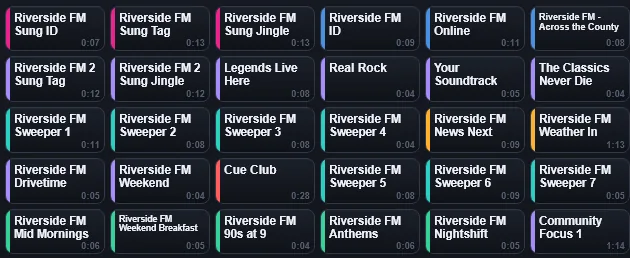
Under the AI and the automation is a full live playout desk. Drive the show yourself, fire jingles off the cart wall, talk over intros, and hand the air back to automation when you're done.
- Auto, Assist or Manual. Automation drives the segues, backtiming, hard times and the next hour. In Assist or Manual you fire each item yourself.
- Play next, stop, jump. Space plays the next item, S stops after this one, and "now" on any row jumps straight to it.
- Mic and talk-over. The mic is one button (or M). Talk over intros and segue when it feels right.
- Edit the log while it plays. Drag rows to re-order the hour (never the item on air), and right-click to drop in travel or weather on the fly.
- Take the air, hand it back. Take at junction lets the playing item finish first; Take now fades in 1.5 seconds. Release air hands back to automation or the cloud engine. Only one source is ever on air.
- Hard times. Pin the news or an ad break to the second, and the music before it stretches or shaves to land it.
- Imaging plays as produced. Jingles, sweepers, IDs and adverts each have their own type and always play in full.

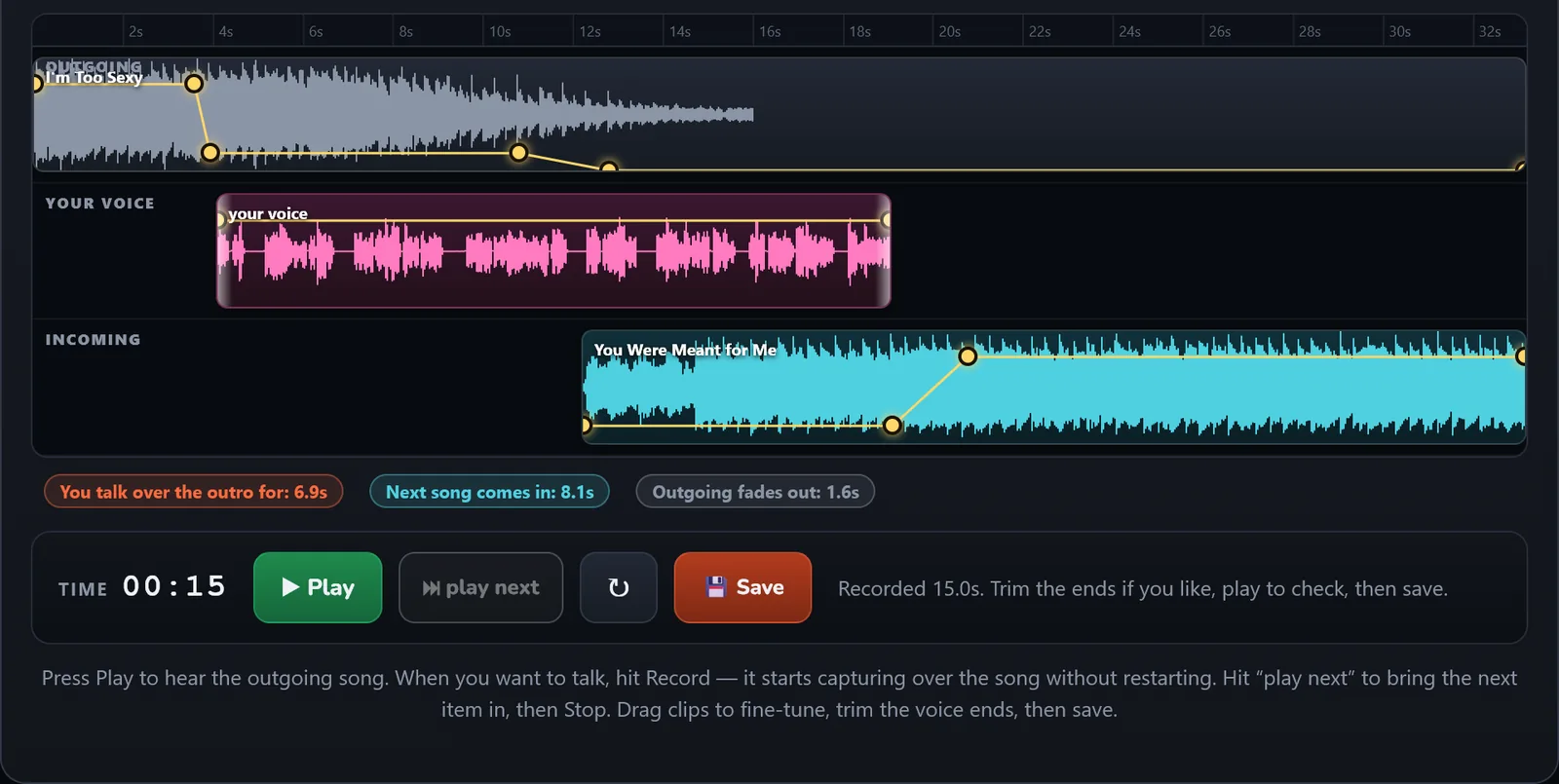
Every junction, edited by ear.
Open any junction and you get three lanes: the outgoing song, your voice and the incoming song. Play, talk, bring the next one in under you, exactly as it will air.
- Mix points found on upload. Trim in, intro, extro and trim out, with loudness measured. No manual marking.
- The talk-up marker is where the vocal starts. The amber band in the segue editor shows how long you can talk.
- Record over the real song tails. The bed ducks under you, and Play next brings the next song in under your voice.
- Your take ends on your last word. Room silence at the end is trimmed off for you.
- Change one hour or every play. Edit a segue on a log row and only that hour changes. Set it on the library track and every future play follows.
- Saved through the broadcast chain. On save it drops into the log, ready to play.
Out at an event? Voice the show from your phone.
Open app.radiostudio24.com/voicetrack in your phone's browser, sign in, and your show is there waiting for your links. There's no app to install, and one big button walks you through every link.
Record your links from the fete, the match or the gig, and they are in the show before you get home.
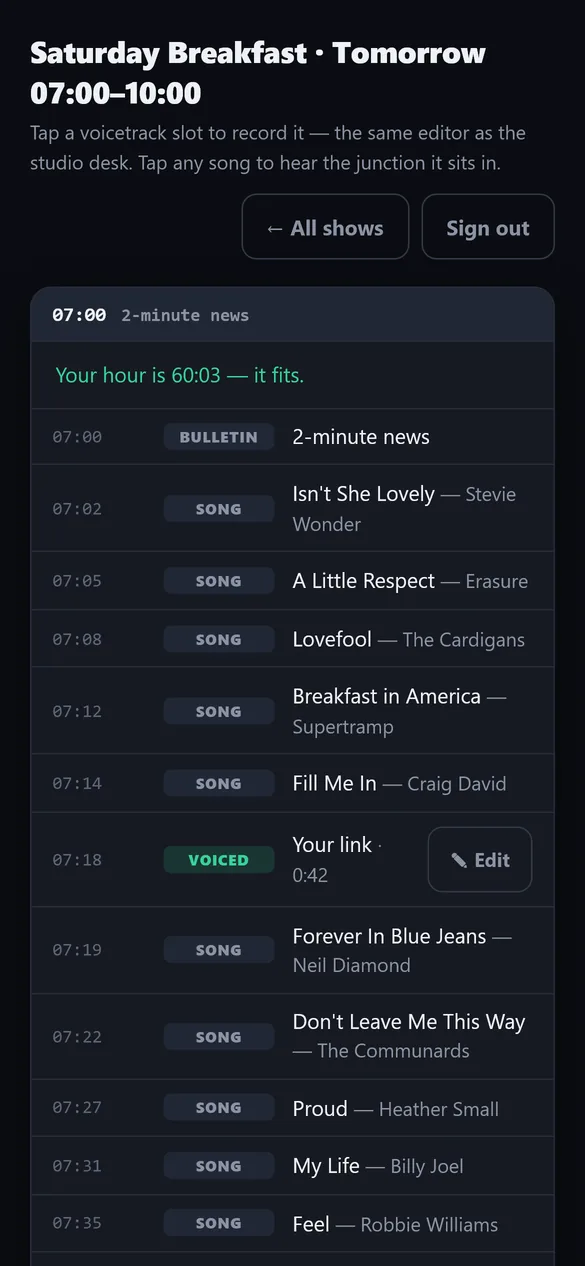
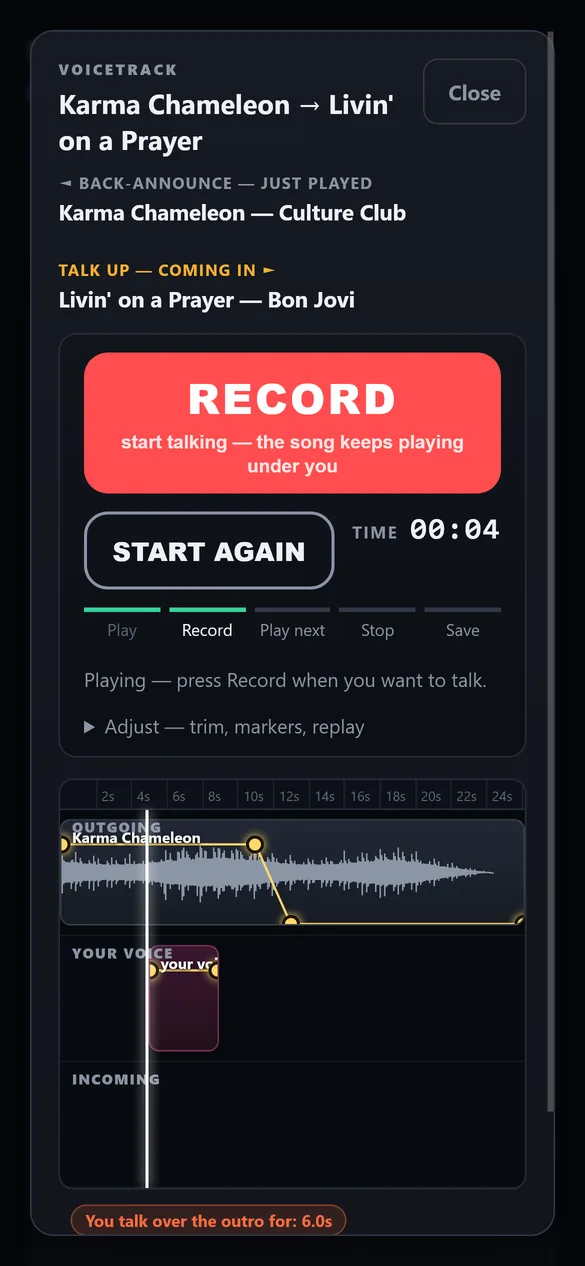
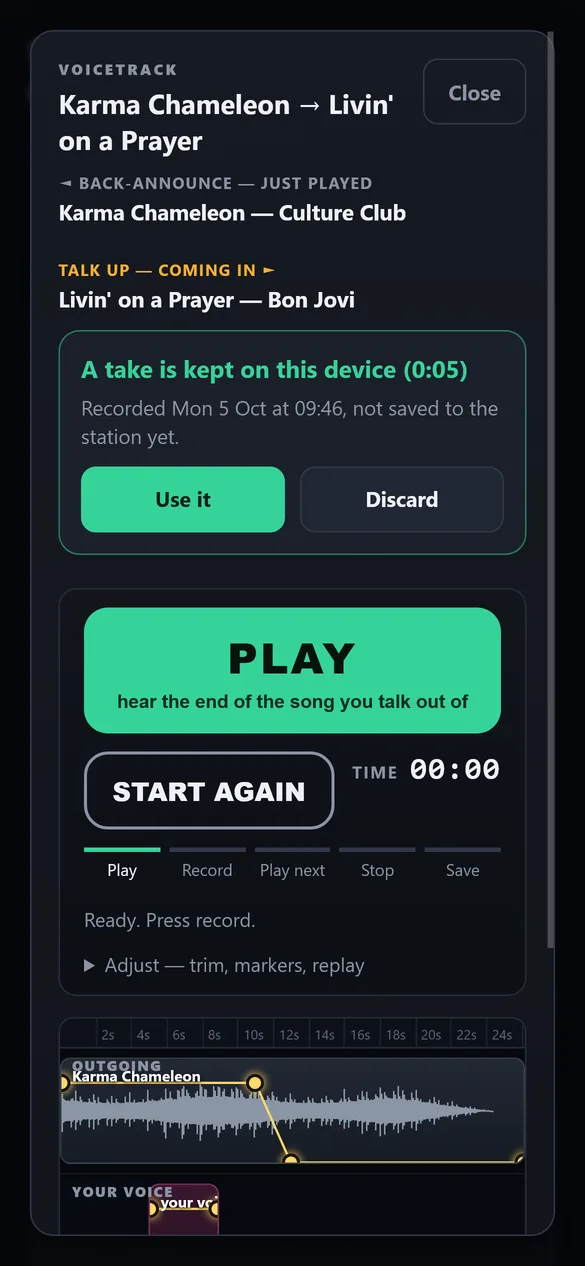
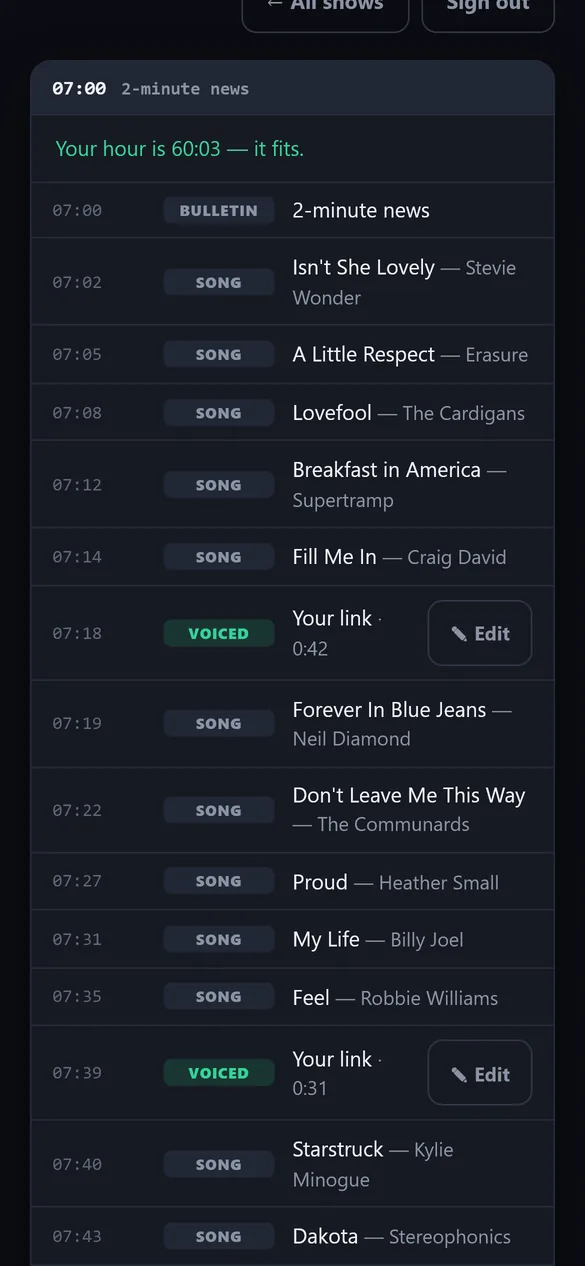
- One big buttonPlay, Record, Play next, Stop, Save.
- The whole show as one running orderWith a bar at each hour and a line telling you if the hour fits.
- A call won't lose a takeA phone call, a screen lock or a bad signal keeps the take on your phone, ready to Use it or Discard.
- Saved means savedIt only says Saved when the station really has your link, and keeps trying on a weak signal.
- Edit and record againA saved link shows its length. Press Edit to do it again.
- No headphones?Choose Record dry. If your links make the hour too long, it tells you which song would be dropped.
Hear it on your own station.
£1 for 5 days on Broadcast, then £59/mo. Cancel before day 5 and £1 is all you pay.
A presenter with your station's brain.
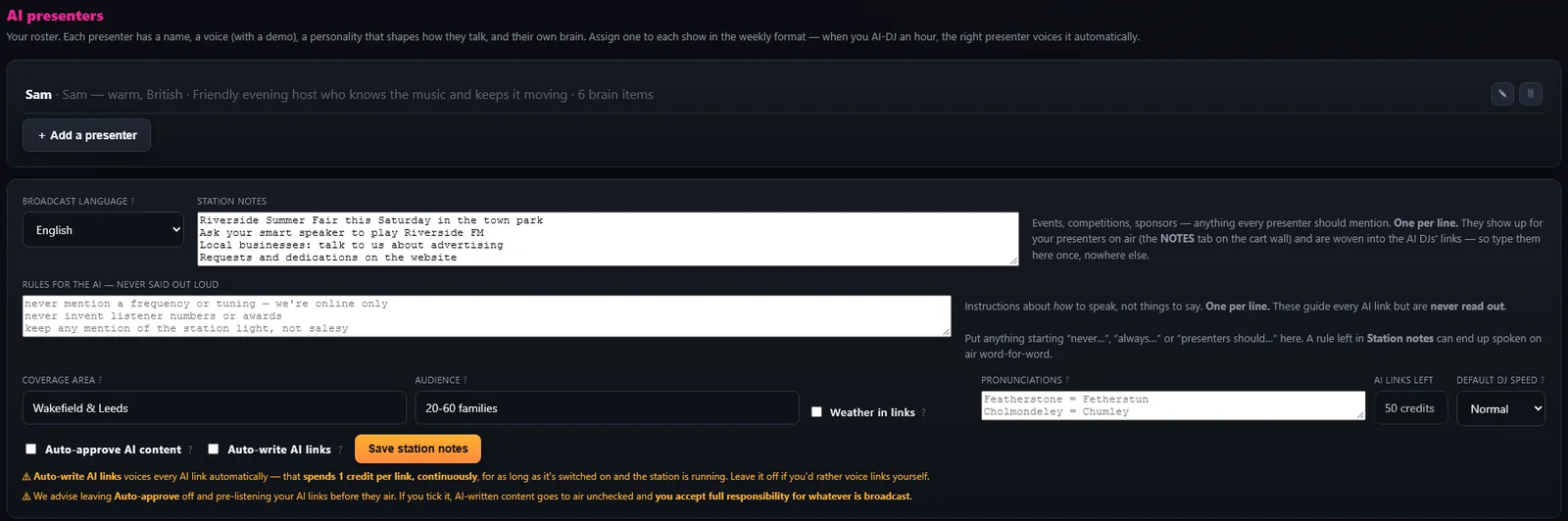
Give each presenter a name, a voice and a personality, and assign one to each show. Feed the station its notes: your area, your events, your features. The presenter back-announces the last song and talks up the next one.
- Talking points for every song. One pass over your library writes the year, the chart run, the writer and the style. Edit any of them.
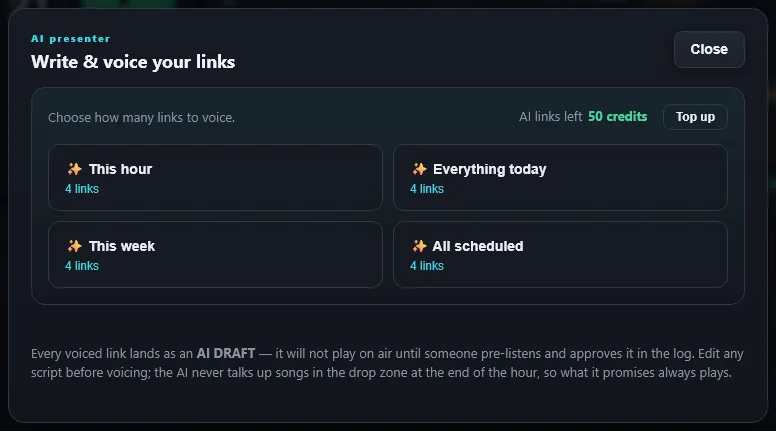
- Drafts until approved. Every voiced link lands as a draft. Nothing airs until someone approves it, unless you switch on auto-approve.
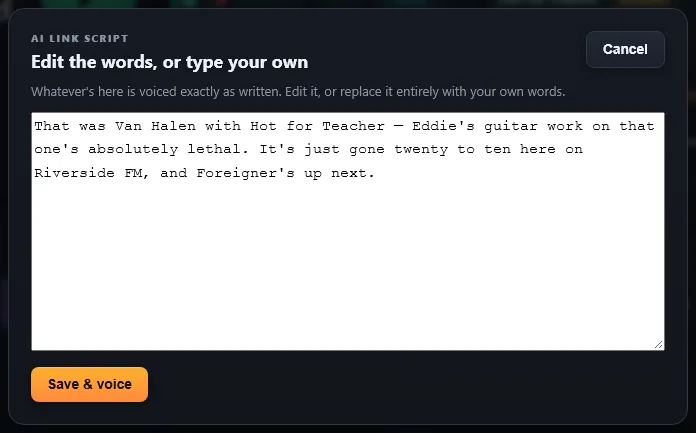
- Your words, if you want them. Open any script and rewrite it. It is voiced exactly as you type.
- This hour, today, this week or everything scheduled. Voice as much or as little as you like in one go.
- Choose from a library of professional voices. Browse by country: British, American, Australian, Irish, Canadian, Indian and South African English, or Spanish, German, French and Italian voices in their own languages.
- 300 AI links a month on Broadcast. On Studio the AI presenter is pay as you go.
Local travel and weather, voiced for you.
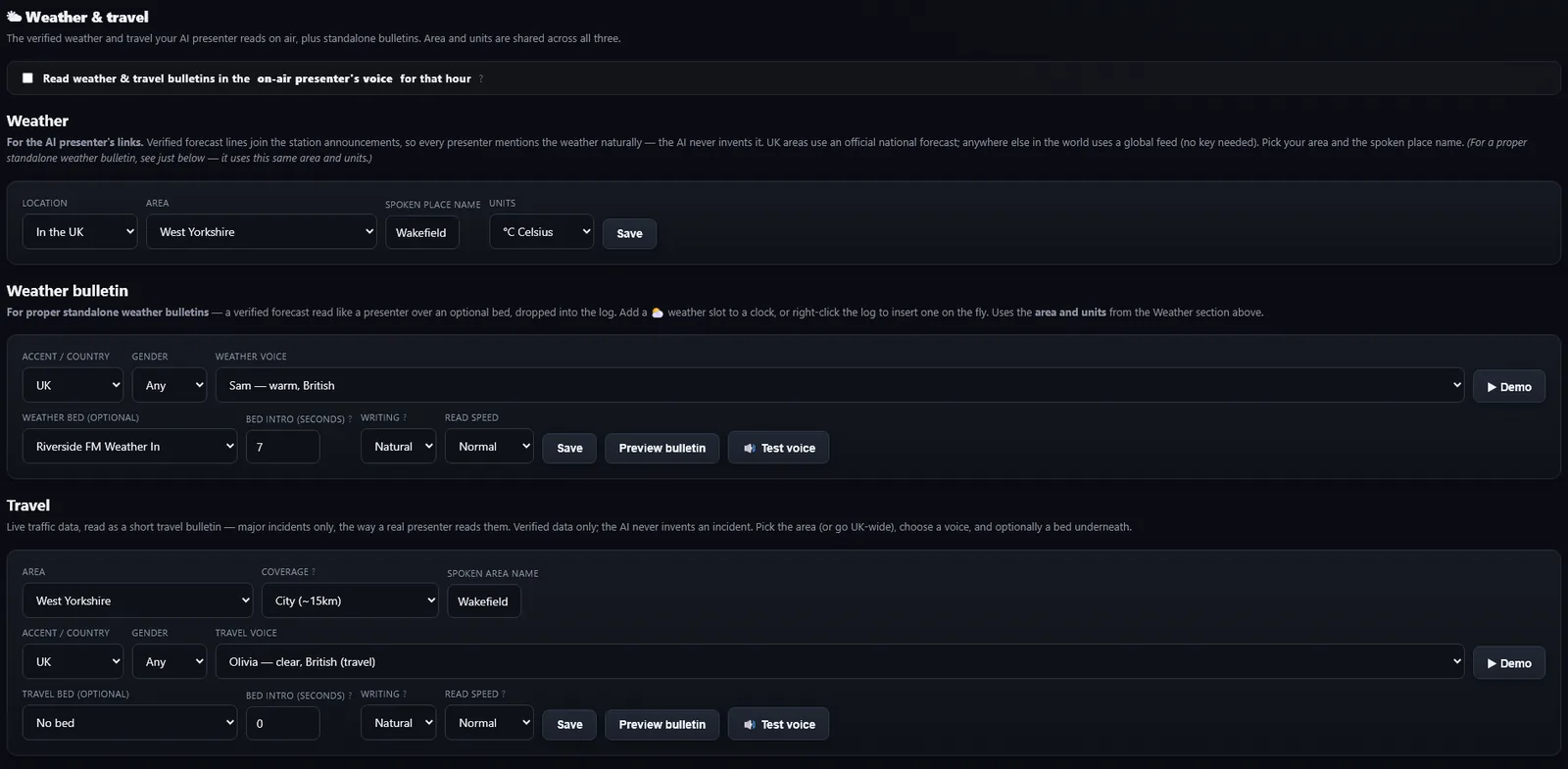
Live travel and the real forecast for your area, written and voiced as a bulletin, and dropped into your log.
- Travel from live incident data. Major incidents and closures only, read in under 80 words.
- Weather from the Met Office for UK stations, in the voice you choose, over a music bed if you want one.
- Current when it airs. Put travel on auto and it is checked and voiced close to the time it plays.
- Nothing made up. If there is nothing to report, it is not mentioned.
You heard it in the demos: Wakefield and Leeds roads and the Wakefield forecast, recorded from live data on 7 October 2026.
Your whole week, at a glance.
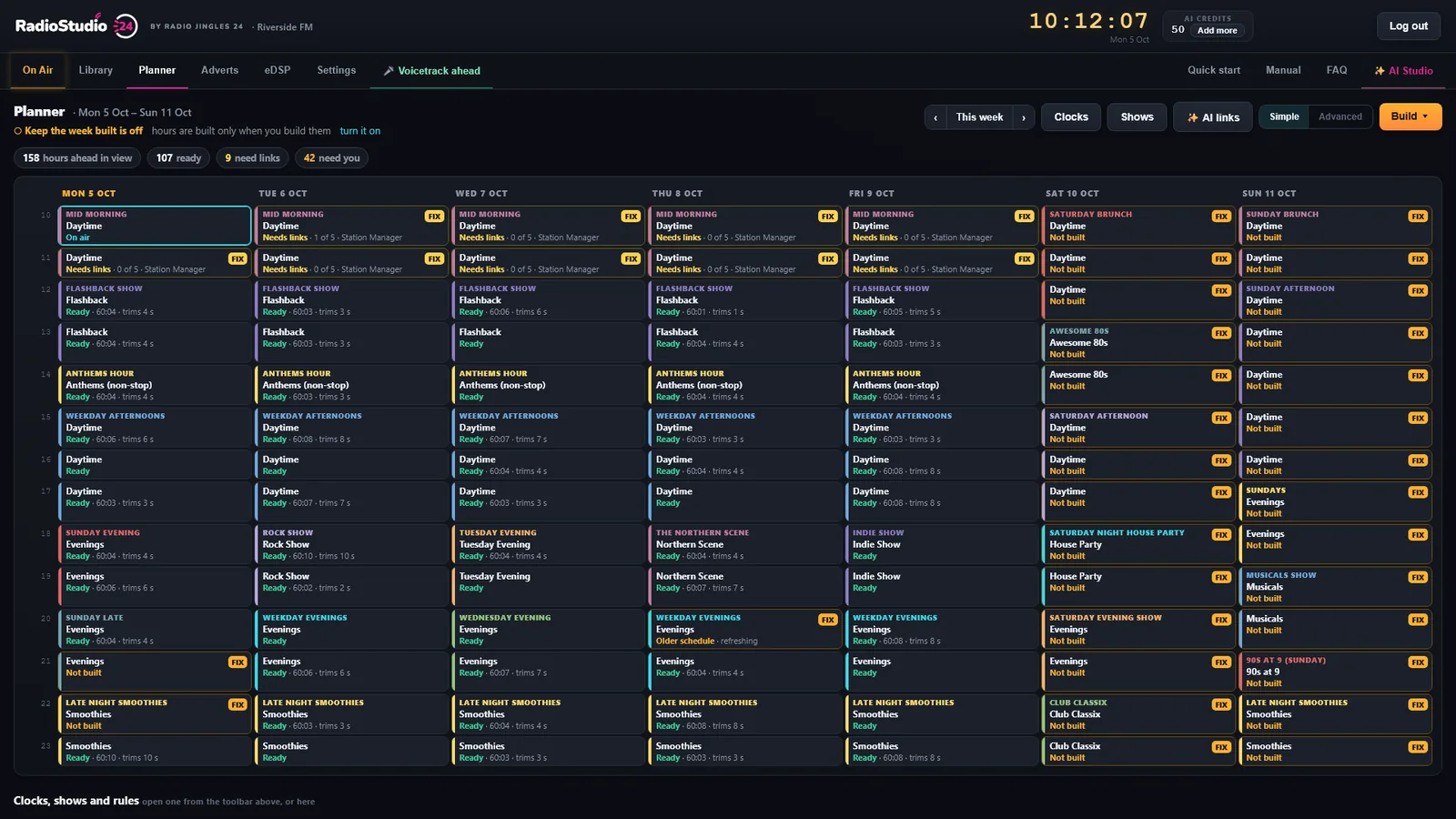
Build your clocks, paint them across the week, and see the state of every hour: On air, Ready, Needs links, Not built. Switch on keep building and the server tops up future hours from your schedule, from a day to four weeks ahead.
- A visual clock wheelSee the whole hour, with live guide times from your own library as you build.
- Real rotation rulesArtist and title separation, plus era, gender, tempo and genre coding.
- Hard, soft and reset markersPin news to the second, aim for a time without chopping a song, or re-anchor.
- A month ahead on BroadcastBuild a run of hours in one go. Hours already built or on air are never touched.
On air 24/7. No studio PC.
Your station plays from our servers around the clock. Close the laptop, switch off the PC, it keeps playing. When a presenter wants to go live, they take the air at the next song. Press release at the end of the show and the cloud picks straight back up.
Music, imaging, logs
Uploaded once, analysed, scheduled from your clocks.
Plays on our servers
Runs the log 24/7 with nothing left on at your end.
Icecast or SHOUTcast
Streams to the server you already use. Your stats, players and apps stay put.
Take at junction
A presenter takes the air at the next song and releases it at the end.
The cloud engine comes with Broadcast (£59/mo) and above. It is not part of the £1 trial: it switches on with your first payment.
The difference.
- An AI presenter that knows the playlistLinks written from the songs either side and your notes, in a voice you pick.
- Talking points for every songOn the deck as it plays, for the AI or for you live.
- Local travel and weather, voicedLive incident data and the Met Office, written and read as a bulletin.
- Voicetracking from a phoneIn the browser, no app, built to survive a call or a bad signal.
- A cloud engine with no studio PCOn air from our servers, streaming to your own server.
- A broadcast processor built inAGC, five-band compression, clipping and true-peak limiting on your output.
- Every hour's state for the weekOn air, Ready, Needs links, Not built, on one screen.
- Runs in ChromeNothing to install, no servers to run, no licence to move.
Upload thousands of tracks
Every song is coded for genre, era, tempo and energy, rated for how big a hit it was, and given talking points, so your separation rules just work.
Traffic and proof-of-play
Campaigns with dates, plays per day and dayparts book themselves into the log. Export scheduled against actual air time for the client.
Returns in one click
PRS/PPL music returns, the full as-aired record and a printable log for the studio, as CSV.
A processor on your output
Pick a format preset and ride one LESS to MORE knob. Gated AGC, a five-band compressor, true-peak limiting and mono-safe width underneath.
Radio News Hub, connected
Connect Dropbox once and bulletins arrive and drop into your hour. A stale bulletin is skipped, so yesterday's news never airs. FTP works too.
Hosted, or your own
Add hosted streaming at checkout for £10/mo, with a listen link and a now-playing widget for any website. Or plug in the stream you already have.
AI Studio imaging goes straight into your libraryFive short walkthroughs.
Start for £1. Keep it if it earns its place.
Try Broadcast for £1 for 5 days, or skip the trial and have everything from day one. Pick a plan, add hosted streaming if you want it, and the total updates as you go.
£1 for 5 days to test the whole system. The 24/7 cloud engine, your full AI allowance and voice clones switch on at your first payment on day 5.
Already have a stream (Icecast, SHOUTcast, AzuraCast, Radio.co)? Leave this off. Every cloud plan streams to your existing server, with no lock-in.
Already a station? Log in to your studio
- ✓The full desk: scheduler, traffic, voice tracking and the eDSP processor
- ✓À propos 25 AI presenter links to try
- ✗Not yet: the cloud engine, voice clones or the full AI allowance
- ✓The always-on cloud engine, 24/7
- ✓Your full monthly AI allowance
- ✓Custom voice clones, switched on for you
Every plan is the full playout system. Broadcast, Pro and Ultra start with a £1, 5-day trial, then the monthly price; Studio is billed today. Cancel any time in your members area before your first bill and £1 is all you pay. AI presenter allowances refill each month, and you can top up AI credits from inside the app. Hosted streaming is an optional £10/mo add-on.
Straight answers.
Will the AI make things up?
No. Weather and travel come from real, verified feeds, and if there is no data it simply isn't mentioned. Times and numbers are locked by a hard gate. Nothing airs until you approve it: every link lands as a draft you can approve, re-take or rewrite, unless you switch on auto-approve.
Can I edit what the AI says?
Always. Open a draft, read the script and rewrite it. It is voiced exactly as you type.
Can I voicetrack on my phone?
Yes. Open app.radiostudio24.com/voicetrack in your phone's browser and sign in. There's no app to install. Your whole show opens as one running order, and one big button walks you through each link: Play, Record, Play next, Stop, Save. If a call comes in, the screen locks or the signal drops, your take is kept on the phone and offered back, and it only says Saved once the station has it.
If I close my laptop, does the station stop?
Not with the cloud engine on: it runs on our servers, independent of your computer. Without it, streaming from the desk stops when you close the tab. The cloud engine comes with Broadcast and above.
Will I know if my station goes off air?
Yes. Turn on silence monitoring and we sample your live stream about once a minute and email you if it is silent or unreachable for a few minutes.
Do I need to install anything?
No. RadioStudio24 runs in your web browser; use Google Chrome. Any reasonably modern PC or Mac and a stable internet connection will do.
How does the £1 trial work?
Broadcast, Pro and Ultra start with a £1, 5-day trial. £1 today gets you the full desk for 5 days with a sample of AI links; after that it is the plan's monthly price. Cancel any time before day 5. The cloud engine switches on when you become a paying customer.
£59 is more than I need. Can I pay less?
Yes. Studio is £29/mo: the full desk, streamed from your browser, without the 24/7 cloud engine. Ask and we'll switch you before you're charged.
Can more than one person use it?
Yes. Create presenter logins under Settings, Your team. Studio includes 3 seats; Broadcast is unlimited.
Who makes it?
RadioStudio24 is made by RadioJingles24, the team that has produced jingles and imaging for radio stations since 2014.
Your station. On air around the clock.
£1 for 5 days on Broadcast · then £59/mo · cancel before day 5 and £1 is all you pay